I’ve created this project as a playground to see what the state of desktop development in Java is at the moment and to try JavaFX and some techniques that I’d never tried before but wanted to.
At the same time, I want to go beyond the usual “Hello world” and have something more or less complex but still simple enough to do big refactorings or even full rewrites if needed.
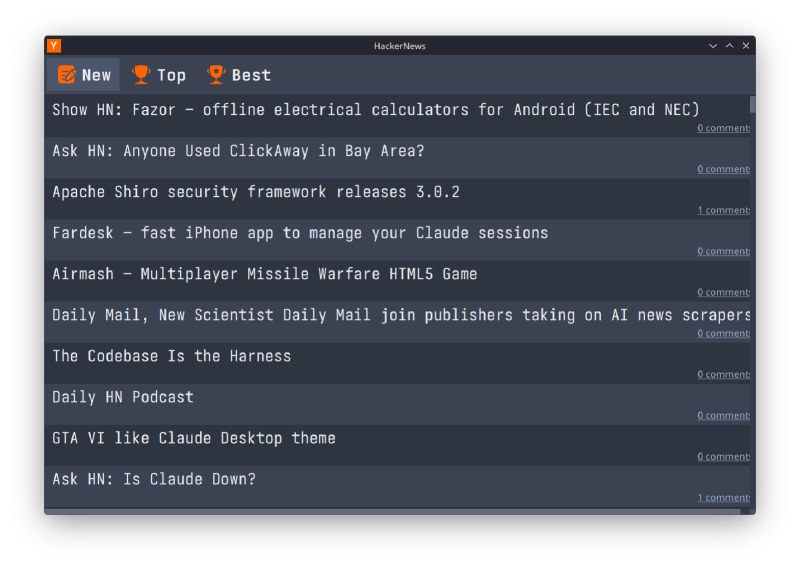
So, lo and behold, a Hacker News JavaFX client!
Obligatory source code can be found here
What is this all about#
Whenever I worked with desktop applications, I saw the same techniques in code from 15(?) years ago:
- Lack of Dependency Injection (DI).
- As a consequence, either abuse of singletons or a parameter nightmare in the constructors, when all required objects were passed through a chain of invocations.
- And as another consequence, usually in projects with singleton abuse — lack of tests.
You won’t find any nifty JavaFX tricks here, since I myself am a rookie in that area.
This is NOT your usual educational article. I have no experience in teaching, so I assume you will clone the repo and get your hands dirty.
At the same time, I hope you’ll find some basic building blocks for your application that I’d like to bring from the back-end world into desktop development.
What’s under the hood#
Maven, JDK. How to build and run#
It’s a standard Maven project on vanilla JDK 25. “Vanilla” here means — any standard JDK without JavaFX modules included.
To build the project, run:
# Reformat the code, rebuild the project, package it and create a jlink image
./mvnw clean spotless:apply package jlink:jlink

# After that you should be able to find hackernews-1.0.0-SNAPSHOT-**.zip in target/
# Or unpacked here (I'm on Linux, so I have "linux" as the classifier):
tree target/maven-jlink/classifiers/linux/bin
target/maven-jlink/classifiers/linux/bin
├── HackerNews
├── java
├── keytool
└── rmiregistry
Now you can run target/maven-jlink/classifiers/linux/bin/HackerNews and observe the nice colored logs in the console.
16:21:30.420 INFO  [JavaFX-Launcher] i.a.config - Loaded properties from [resource:application.properties]
16:21:30.573 DEBUG [reload-stories] s.u.h.f.s.StoriesInteractor - Loading new stories: NEW
16:21:30.581 INFO  [JavaFX-Launcher] i.a.inject - Wired beans in 148ms
16:21:30.629 DEBUG [JavaFX Application Thread] s.u.h.f.HNApplication - Applying styles
16:21:30.668 DEBUG [JavaFX Application Thread] s.u.h.f.HNApplication - Creating main window

16:21:30.919 INFO  [hn-http-2] j.h.HttpClient - REQUEST: https://hacker-news.firebaseio.com/v0/newstories.json GET
16:21:31.065 INFO  [hn-http-3] j.h.HttpClient - RESPONSE: (GET https://hacker-news.firebaseio.com/v0/newstories.json) 200 HTTP_1_1 Local port:  36838
16:21:31.098 INFO  [load-story-50575924] j.h.HttpClient - REQUEST: https://hacker-news.firebaseio.com/v0/item/50575924.json GET
16:21:31.260 INFO  [hn-http-24] j.h.HttpClient - REQUEST: https://hacker-news.firebaseio.com/v0/item/50575899.json GET
It’s also possible to create a distribution package via jpackage:
# Supports Linux, macOS or Windows
./mvnw clean spotless:apply javafx:jlink jpackage:jpackage@linux
#./mvnw clean spotless:apply javafx:jlink jpackage:jpackage@mac
#./mvnw clean spotless:apply javafx:jlink jpackage:jpackage@win
I tried this only on macOS, where it creates a DMG (Apple Disk Image), since on Linux jpackage creates a DEB, and I’m on Arch (SteamOS).
Record builder#
This project is using RecordBuilder, an annotation processor that generates builders for Java records. It’s not the only one, and you can find some alternatives, like Google’s AutoValue or Immutables. I just like this one more than the others.
As the name implies, it generates builders for your Java records, so instead of creating them via a long constructor:
@Json
@RecordBuilder
public record StoryItem(
        long id, String by, Optional<Long> descendants, long score, long time, String type, String title, String url) {
    public StoryItem {
        requireNonNull(by);
        descendants = requireNonNullElseGet(descendants, Optional::empty);
        requireNonNull(title);
        url = requireNonNullElseGet(url, () -> "https://news.ycombinator.com/item?id=" + id);
    }
}
you can use the builder conveniently generated for you:
StoryItemBuilder.builder()
    .id(id)
    .by(FAKER.credentials().username())
    .descendants(FAKER.random().nextLong(1, 100))
    .time(Instant.now().getEpochSecond())
    .type("story")
    .title(FAKER.book().title())
.build();Don’t use Lombok for things like this. Ever. The biggest difference between annotation processing generators and Lombok is that the former generate proper Java code in a standard way and the latter messes with your compile process to inject generated bytecode.
Hacker News API and HTTP client#
Hacker News has an API and for the client part I use standard java.net.http.HttpClient with Avaje Jsonb.
It’s not the usual Jackson which you may be used to seeing, but in this project I want to try compile-time processing in favor of runtime processing and avoid reflection as much as possible.
Avaje Jsonb uses Java annotation processing to generate Java source for adapting JSON to/from java objects.
For caching responses I use Caffeine — the well-known and widely used caching library.
JavaFX and threading#
The UI is very simple. You have a list of stories and three buttons. You’ve seen it.
What is worth mentioning is that I applied the MVCI paradigm described here.
I’ve found it quite simple to understand and looking back, I think this paradigm solves one thing that others forget about: the threading issue.
The problem is that in every UI framework you have One Thread to rule them all to interact with a graphical interface. In Swing it’s the EDT (Event Dispatch Thread), in JavaFX it’s the JavaFX Application Thread.
The idea is the same. On that special thread you do whatever is needed for your UI part. And anything else you do off that thread:
- Disabling a button on click — JavaFX thread.
- Loading stories — another thread.
- Updating the UI list component with loaded stories — JavaFX thread.
- Loading story details from the API — another thread.
- Updating the cell renderer with loaded content — JavaFX thread.
That’s a lot of hopping between threads.
If you break this rule, then you get UI slowness, stutters, freezes and deadlocks.
Deadlocks are especially nasty, since they can be platform-specific (I’m looking at you, macOS).
MVCI solves this in an explicit manner. All thread hopping is done in one place — the Controller. It’s easier to reason about and easier to manage.
Dependency injection (DI)#
That’s where things get more interesting. That’s something I haven’t seen in desktop applications at all, and I wondered “why?”.
If you’re not familiar with dependency injection as a concept, then you can start with:
- Martin Fowler’s “Inversion of Control Containers and the Dependency Injection pattern”.
- James Shore’s “Dependency Injection Demystified”.
- Or even this Wikipedia article.
DI as a concept is the foundation of all back-end frameworks, but in UI development it’s rarely mentioned. DI gives your application properties such as testability, swappability of components, loose coupling, explicit dependencies in the constructor (no hidden calls to singletons) and one place to manage your configuration.
All those things are well known to any back-end developer, but on the UI side they are treated as rocket science for no reason.
Avaje Inject to the rescue#
This project is built on top of Avaje Inject and by following a link you can find a good explanation of why Avaje Inject exists when there are frameworks like Spring, Quarkus, Micronaut and others.
Avaje Inject is a perfect fit for any project that requires fast startup times. It’s lightweight. It’s easy to control — you can start using it in your legacy application without rewriting all your components at once. So, be it a UI application or a serverless Lambda function, Avaje Inject fits there really well.
Here is a short snippet showing a simple JavaFX application with DI:
public class HNApplication extends Application {
    private static final Logger LOGGER = LoggerFactory.getLogger(HNApplication.class);

    // All your "singletons", factories, etc. in one place
    private BeanScope beanScope;

    @Override
    public void init() {
        // ...
        beanScope = configure(BeanScope.builder()
                        // HostServices can be created only from Application
                        .bean(HostServices.class, hostServices())
                        .shutdownHook(true))
                .build();
    }

    // In tests, we don't want to use real HostServices, since we don't want to open
    // real browser.
    protected HostServices hostServices() {
        return getHostServices();
    }

    // Also for testing purposes
    protected BeanScopeBuilder configure(BeanScopeBuilder builder) {
        return builder;
    }

    @Override
    public void start(Stage stage) {
        // Internationalization (i18n) service.
        // It behaves like a singleton (but it's not)
        // and keeps a state: the current locale.
        var i18n = beanScope.get(I18n.class);

        // ...
        LOGGER.debug("Creating main window");
        // StoriesController requires other things in order to be created,
        // but that's a DI problem - we just want an object.
        var mainViewController = beanScope.get(StoriesController.class);
        // ...
        var scene = new Scene(mainViewController.getView());
        stage.titleProperty().bind(i18n.binding(AppKey.TITLE));
        // ...
        stage.show();
    }

    @Override
    public void stop() {
        Thread.ofPlatform().start(beanScope::close);
    }

    // Also used for testing
    public BeanScope beanScope() {
        return beanScope;
    }
}
That is a bit more than you’re used to seeing in a usual “Hello world”, but here we’ve done quite a significant part of the application initialization:
- We’ve created a
BeanScope. This means that the DI framework wired up all our dependencies, created all needed objects, and now we can reuse them. - We’ve created a special object —
HostServices. It can’t be created via a constructor, only by requesting it through the Application object. But now, it can be injected into any other object. - We’ve prepared our application to be extended in tests.
- And we’ve already used one of our beans created via DI — the i18n service.
Let’s look at the StoryCellInteractor class, where above-mentioned HostServices is used:
@Lazy
@AssistFactory(StoryCellInteractor.StoryCellInteractorFactory.class)
class StoryCellInteractor {
    private final HostServices hostServices;
    private final HNClient hnClient;

    // Both hostServices and hnClient are injected by the DI framework.
    // We don't care here where they come from or how they were created.
    StoryCellInteractor(@External HostServices hostServices, HNClient hnClient) {
        this.hostServices = requireNonNull(hostServices);
        this.hnClient = requireNonNull(hnClient);
    }

    // ...
    void openComments(long storyId) {
        hostServices.showDocument("https://news.ycombinator.com/item?id=%d".formatted(storyId));
    }

    interface StoryCellInteractorFactory {
        StoryCellInteractor newStoryCellInteractor();
    }
}
DI in tests#
That’s where DI shines. If you used classical singletons, then it would be tricky to replace HostServices by a mock, especially if it’s used deep in your code.
But with DI we just swap it with a mock, which logs the request to open a browser:
@TestScope
@Factory
class TestConfiguration {
    private static final Logger LOGGER = LoggerFactory.getLogger(TestConfiguration.class);

    @Bean
    HostServices hostServices() {
        var hostServicesMock = mock(HostServices.class);
        willAnswer(invocation -> {
                    LOGGER.info("Request to open: {}", (String) invocation.getArgument(0));
                    return null;
                })
                .given(hostServicesMock)
                .showDocument(anyString());
        return hostServicesMock;
    }
}
Here we’ve created a test configuration for our TestScope and all tests will use our mocked HostServices instead of a real one. We don’t mock any other surrounding objects, we don’t pass this mock through the invocation chain or modify our application in any other way. Loose coupling and swappability to the rescue!
UI Tests. TestFX and another TestFX#
You might know about the TestFX project, which is a go-to solution for UI tests in JavaFX. But it’s a bit… stale at the moment.
I use my own fork fx-labs/TestFX which is based on the original one, but heavily rearranged, cleaned up and modernized. Or at least I’d like to believe so. It’s available on Maven Central under the same license as the original one.
Let’s look at the example:
class SwitchViewsTest extends AbstractTest {

    private List<StoryItem> newStories;
    private List<StoryItem> topStories;
    private List<StoryItem> bestStories;

    @Inject
    HostServices hostServices;

    @BeforeEach
    void beforeEach() {
      // Initialize new, top and best stories
    }

    @Test
    void test() {
        clickOn(ViewType.NEW);
        assertView(newStories);

        clickOn(ViewType.TOP);
        assertView(topStories);

        clickOn(ViewType.BEST);
        assertView(bestStories);
    }

    private void clickOn(ViewType viewType) {
        // Locate the button in the scene graph:
        var toggleButton = singleNode(FX_ROBOT.selectNodes(ToggleButton.class, ".toggle-button")
                .fromAll()
                .filter(hasId("view-button-" + viewType.name())));
        // Click
        FX_ROBOT.mouse().moveTo(toggleButton).click();
    }

    private void assertView(List<StoryItem> stories) {
        // Wait until the list is visible
        ListView<?> listView = await().atMost(5, TimeUnit.SECONDS)
                .ignoreException(NoNodeFoundException.class)
                .until(
                        () -> singleNode(FX_ROBOT.selectNodes(ListView.class, ".list-view")
                                .fromAll()
                                .filter(hasId("storyList"))),
                        Node::isVisible);
        // Wait until all stories from the provided model are visible
        for (var model : stories) {
            var listCell = await().atMost(5, TimeUnit.SECONDS)
                    .ignoreException(NoNodeFoundException.class)
                    .until(
                            () -> singleNode(FX_ROBOT.selectNodes(ListCell.class, ".list-cell")
                                    .from(listView)
                                    .filter(hasId("story-cell-" + model.id()))),
                            Node::isVisible);
            assertStory(model, listCell);
        }

        // Assert that we have the expected number of stories in the list
        assertThat(FX_ROBOT.selectNodes(ListCell.class, ".list-cell")
                        .from(listView)
                        .filter(c -> !c.isEmpty() && c.isVisible())
                        .toList())
                .hasSameSizeAs(stories);
    }

    private void assertStory(StoryItem model, ListCell<?> listCell) {
        var storyLabel = singleNode(FX_ROBOT.selectNodes(Label.class, ".label")
                .from(listCell)
                .filter(hasId("story-cell-%d-label".formatted(model.id()))));
        assertThat(storyLabel).extractingText().isEqualTo(model.title());

        var commentsLink = singleNode(FX_ROBOT.selectNodes(Hyperlink.class, ".hyperlink")
                .from(listCell)
                .filter(hasId("story-cell-%d-comments-label".formatted(model.id()))));
        assertThat(commentsLink)
                .extractingText()
                .isEqualTo("%d comments".formatted(model.descendants().orElse(0L)));

        clearInvocations(hostServices);
        FX_ROBOT.mouse().moveTo(commentsLink).click();
        verify(hostServices).showDocument("https://news.ycombinator.com/item?id=%d".formatted(model.id()));
    }
}Notice how easily we injected our mocked HostServices. You can inject any other bean from your bean scope all the same.
MVCI pattern tests#
Patterns are good as long as people (or nowadays machines as well) follow them.
But can you test your design patterns? Of course, you can ask your “AI” overlords to verify, but can you have a unit test for that? Turns out, you can!
Another addition to your toolbox: ArchUnit
Now you can write rules to test your architecture and fail the build if it doesn’t comply:
class PackageBoundariesTest {
    @ArchTest
    static final ArchRule noJavaFXInClient = noClasses()
            .that()
            .resideInAPackage("se.urvantsev.hackernews.client..")
            .should()
            .dependOnClassesThat()
            .resideInAnyPackage("javafx..")
            .because("Package must stay UI-framework independent");

    @ArchTest
    static final ArchRule viewBuildersImplementBuilder = classes()
            .that()
            .resideInAPackage("se.urvantsev.hackernews.fx..")
            .and()
            .haveSimpleNameEndingWith("ViewBuilder")
            .should()
            .implement(javafx.util.Builder.class);

    // And more rules follow
}
Short conclusion#
I’m still a rookie in JavaFX, and there is plenty left to explore, but I wanted to show you, especially if you’re a beginner, that desktop development doesn’t have to be stuck in the past.